
When you’re setting up indoor IP cameras, choosing the best local storage for indoor IP cameras is crucial. You want something that keeps your recordings safe and secure while making it easy to access when you need it. Here are some solid storage options to consider:
1. Network Attached Storage (NAS): A NAS unit is like having your own private cloud. It connects directly to your home network, letting multiple cameras save footage in one spot. Look for models with enough drive space and RAID support to prevent data loss.
2. External Hard Drives: If you want a straightforward solution, an external hard drive could be your best friend. Just connect it to your camera or your computer, and you’re good to go. They come in various sizes, so you can pick one that fits your storage needs without breaking the bank.
3. MicroSD Cards: For a super compact option, go with microSD cards. Many indoor IP cameras have slots for these, and they can easily record hours of footage. Just make sure you choose a card with a high writing speed and enough capacity for your camera's demands.
4. USB Flash Drives: If you want something small and portable, a USB flash drive is a great choice. They’re easy to use and can store a decent amount of video. Just plug it into your camera or use it with your computer for playback.
With these options, you’ll find the best local storage for indoor IP cameras that fits your needs. Whether you opt for a NAS, external hard drive, microSD card, or USB flash drive, you’ll have peace of mind knowing your footage is safe and accessible.
Factors to Consider When Choosing Storage
When you're on the hunt for the best local storage for indoor IP cameras, there are a few key things to keep in mind. You want to make sure you're choosing something that suits your needs without breaking the bank.
First off, think about how much space you'll need. If you're using multiple cameras or recording in high resolution, you'll want plenty of storage. Look for options that offer expandable storage or larger capacities. A good rule of thumb? Aim for at least a few terabytes if you want to store footage for a while.
Next, consider the format of the storage. Hard drives are a popular choice, but solid state drives (SSDs) offer faster access times and are more durable since they have no moving parts. If you want something reliable that stands the test of time, an SSD might be the way to go.
Don't forget about connectivity! Some storage devices connect via USB, while others use network connections. Make sure whatever you choose can easily hook up to your setup. If you're going for wireless options, check out the speed and range to avoid any hiccups.
Finally, keep an eye on compatibility. Ensure the storage option you pick works seamlessly with your indoor IP cameras. You want to avoid those frustrating moments where your setup just won’t cooperate. Getting the best local storage for indoor IP cameras makes all the difference in keeping your home secure.
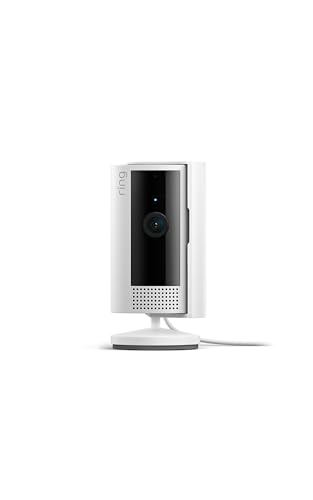
Ring Indoor Cam (2nd Gen) | 2023 Release | 1080p HD Video & Color Night Vision | White
Enhance Your Home Security with Crystal-Clear Video Quality and Night Vision Clarity
Product information
Product Review Score
4.74 out of 5 stars
(127 reviews)Product links
Top Brands for Indoor IP Camera Storage
When it comes to finding the best local storage for indoor IP cameras, you want brands that have built a solid reputation for reliability and performance. Here are some top brands to consider:
- Synology: Known for their user-friendly NAS devices, Synology offers great options for storing video footage. Their user interface makes it simple to manage your recordings, and you can scale up storage as needed.
- QNAP: Another strong player in the NAS market, QNAP provides powerful storage solutions. Their models often include features like remote access and multimedia support, which can be a game changer for monitoring your indoor cameras.
- Western Digital: This brand is famous for its hard drives, and their specialized surveillance drives are perfect for IP camera storage. They are designed to handle the constant writing that comes from security feeds, ensuring that your recordings are safe and sound.
- Seagate: Similar to Western Digital, Seagate has a range of hard drives tailored for surveillance systems. Their drives are reliable, and their writable capacity is fantastic for keeping all your video history.
When searching for the best local storage for indoor IP cameras, think about what features matter most to you. Do you need easy access to your footage? Or maybe a lot of space for longer retention? Each of these brands brings something unique to the table, making them worth a look for your camera setup.
How to Set Up Your Storage Solution
Getting your storage solution set up for your indoor IP cameras doesn’t have to be a headache. With a few straightforward steps, you can ensure that you have the best local storage for indoor IP cameras. Let’s break it down so you can get everything up and running smoothly.
First, choose the right type of storage. External hard drives and Network Attached Storage (NAS) systems are popular options. External drives are easy to use, while NAS gives you more flexibility and allows multiple cameras to connect. Make sure to pick one with enough space for your needs!
Next, connect your storage device to your network. For NAS, follow the manufacturer’s instructions to plug it into your router and set it up. If you’re using an external hard drive, just connect it directly to your computer. Remember to format the drive as necessary, especially if it’s new. This ensures your cameras can save footage properly.
Now, it’s time to set your cameras to save footage to your chosen storage. Open your camera’s settings through its app or web interface. Look for storage options and select the external hard drive or NAS you’ve set up. Make sure to schedule recordings and adjust video quality based on your storage capacity — this helps optimize space.
Lastly, test everything! Check if your cameras are saving video to the storage. Play back recordings to make sure it’s all working as it should. If you encounter any issues, most devices have helpful online support or user manuals you can refer to. With these steps, you’ll have the best local storage for indoor IP cameras, ensuring all your footage is safe and sound.


